
Static Hosting vs a Web Server: Which Is Best for Your Business Website?
Here’s a number worth sitting with. Security company Patchstack recorded 11,334 new vulnerabilities in the WordPress ecosystem in 2025, up 42% on the year before. That’s from their State of WordPress Security in 2026 report.
A caveat before I go on. Patchstack sells WordPress security, so they have an interest in that number looking big. By their own count only about a third were serious enough to need active protection.
It’s also not really a WordPress problem. Only 6 of those vulnerabilities were in WordPress itself, and all were low priority. 91% were in plugins.
So this isn’t a post about WordPress being bad. It’s about what happens when your website is a piece of running software, with a dozen add-ons from a dozen different authors, sitting on the public internet.
Why this matters more now
For a long time the answer to this was “keep everything up to date”. Have your developer run updates once a month and you’d mostly be fine.
That advice assumed you had time. You don’t have as much anymore.
The same Patchstack report found that for the most heavily attacked vulnerabilities, the first attacks typically arrived within 5 hours of the issue becoming public. Nearly half of all the vulnerabilities they tracked had no fix available from the plugin’s developer on the day they were disclosed.
AI is part of this. The tools we use to build software faster are just as good at reading code and finding the holes in it. Patchstack describes attackers equipped with AI that is increasingly capable of finding and exploiting vulnerabilities on its own.
You can’t out-patch a 5 hour window with a monthly maintenance plan.
You can improve your odds. Automatic updates and a web application firewall both help, and a good managed host will run them for you. But that’s more software to pay for and trust, protecting software you may not need in the first place.
For most business websites, I think the better answer is to remove the thing that needs patching.
What “static hosting” actually means
On a traditional website, every time someone visits a page, a server runs code, asks a database for the content, builds the page and sends it back. That server and database are running all day, whether anyone is visiting or not.
A static website does that work once, in advance. When you publish, every page is built and saved as a finished file. Those files are copied to data centres around the world, and visitors are simply handed the nearest copy.
On AWS that means two services. S3 is where the files are stored. CloudFront is the network that delivers them securely from a location close to each visitor.
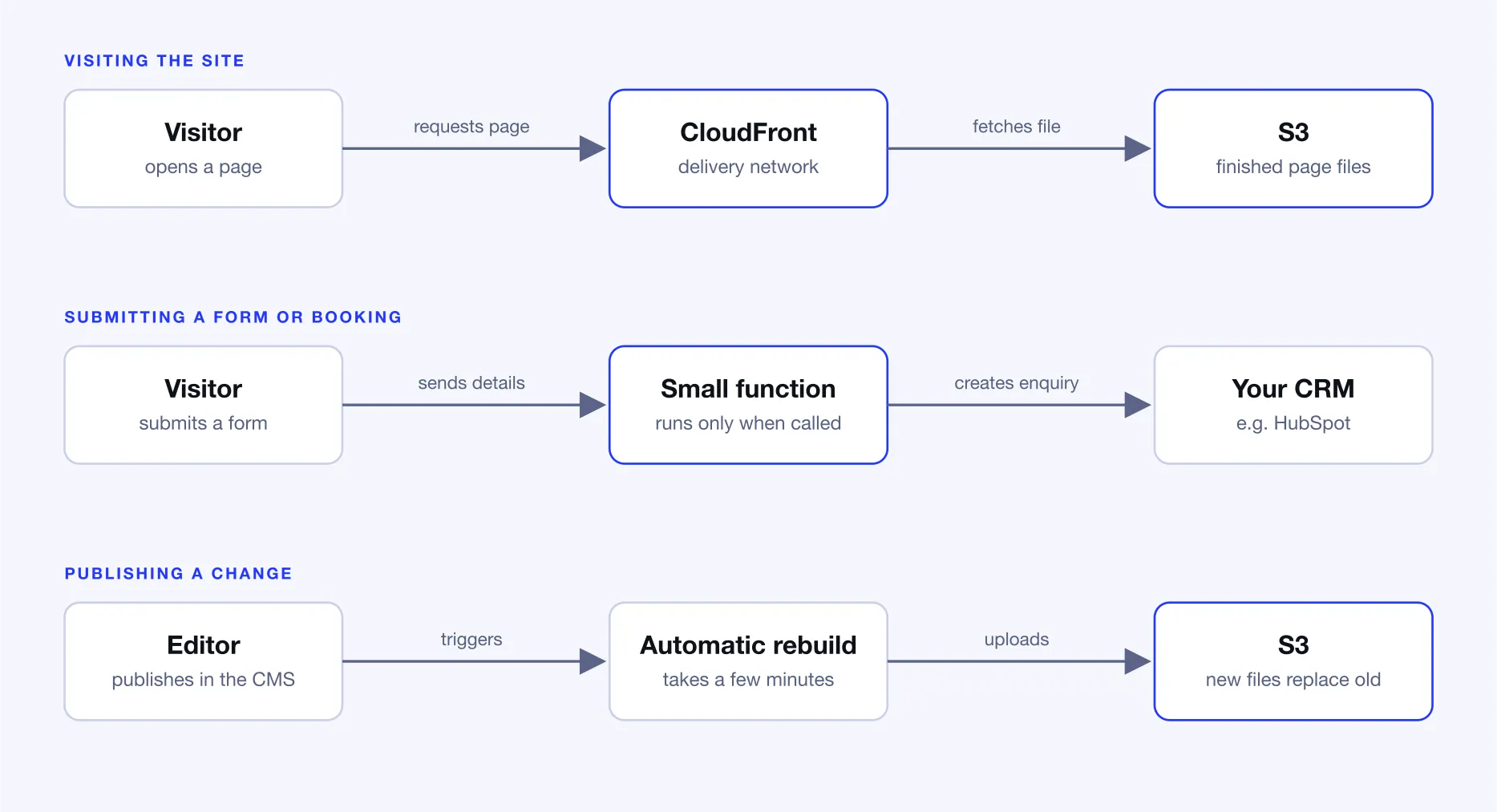
Static doesn’t mean a basic brochure site. Contact forms, booking requests and site search all still work. They’re handled by small functions that only exist for the moment they’re called, instead of a server that runs around the clock.
The framework we use most for this is Astro, though it isn’t the only one.
Server vs static
When I say “server” I mean anything that builds your pages on request. That includes a managed WordPress host, a VPS, or a virtual machine in the cloud.
One caveat. The numbers above are about WordPress and its plugins, because that’s what most small business websites run on. A lean, custom-built site on a well-managed server, with no plugins, doesn’t carry the same risk. It is still software running on the public internet that someone has to keep patched.
| Static hosting | Always-on server | |
|---|---|---|
| Security | No database, plugins or admin login on the public site | Server software, CMS and plugins need ongoing patching |
| Maintenance | Very little once it's set up | Updates, backups and monitoring, forever |
| Hosting cost | Usually a few dollars a month | A fixed monthly fee, busy or idle |
| Speed | Finished pages served from close to the visitor | Pages built on request, unless well cached |
| Traffic spikes | Absorbed by the delivery network | Needs caching or a bigger server |
| Content changes | Live in a few minutes | Instant |
| Logins and live data | Needs extra pieces added | Built in |
A server wins the last two rows. For most business websites, where content changes a few times a week and nobody logs in, those wins don’t matter much.
“But my website does more than show pages”
This is the objection I hear most. Take a typical WordPress site for a training or tour business. A few hundred pages, a page builder, a bookings plugin, a forms plugin, a search plugin, and a dozen more besides.
Every one of those plugins is something that has to be kept up to date, and something that can break when it is.
Here’s how the same site works as a static build.
- Content editing. Your team edits in a headless CMS, which is a content editor that lives separately from the website. When they hit publish, the site rebuilds itself and the change is live a few minutes later.
- Forms and booking requests. Visitors fill in the form, or add items to a cart in their browser. When they submit, one small function passes the request to your CRM, such as HubSpot, where your team already works.
- Search. The search index is built when the site is published. There's no search service to pay for or maintain.
The visitor sees the same website. Behind it there’s no server, database or plugin to patch.
The honest downsides
Static hosting isn’t free of trade-offs, and anyone who tells you otherwise is selling something.
- Publishing isn't instant. Changes take a few minutes to go live. If you publish breaking news, that matters. If you update a team page, it doesn't.
- Setup is more involved. There's no one-click install. A developer has to connect the hosting, the CMS and the publishing process properly at the start.
- You need a separate CMS. If you want to edit content yourself, a headless CMS replaces the WordPress admin. It may have its own subscription, and previewing a page before it goes live takes extra work to set up.
- You'll need a developer for structural changes. There's no plugin directory to install a new feature from. I'd argue that's the point, but it is a change.
- It isn't unhackable. The public website has almost nothing to attack, but your CMS, hosting and code accounts still need strong passwords and multi-factor authentication. Third-party scripts you add, like chat widgets and tracking tags, and the code packages your developer builds the site with, are also ways in. The risk moves somewhere much smaller and easier to defend. It doesn't vanish.
On cost, the hosting bill really is small. But don’t choose static to save money on hosting. The saving that counts is the maintenance you no longer pay for and the clean-up after a hack that you never have to do.
It’s also fair to say that a well-run WordPress site, on a good managed host, with a handful of reputable plugins, can be perfectly safe. Hosted platforms like Webflow take the patching off your plate too. We build on both, and I’ve written about choosing between Webflow and Astro before.
Where static stops making sense
People often assume the limit is the size of the site. It’s usually not. The limit is what the site has to do.
- Logged-in areas. Member portals and customer dashboards show different content to each person, so the pages can't be built in advance.
- Live data. Stock levels, seat availability or prices that change through the day will go stale on a page that was built this morning.
- Constant publishing. If content changes every few minutes, rebuilding the site each time is wasteful.
- Full ecommerce. Checkout, inventory and customer accounts need real back-end logic. A static site can sit in front of a hosted store like Shopify, and that works well, but the store itself still runs on someone's servers. Building your own is custom software.
Size does matter eventually. As a rule of thumb, a few thousand pages is comfortable and tens of thousands takes care. Beyond that it can get painful. One team running a 125,000 page Astro site moved away from static once a full rebuild was taking more than 6 hours.
Very few business websites are anywhere near that.
Even when you hit one of these limits, the answer is rarely to go back to an always-on server. It’s usually a mix. Keep the marketing pages static, and build only the parts that need it, like a member area, on demand.
Where to host a static site
S3 and CloudFront is one good home for a static site. It isn’t the only one.
It suits a business that is already on AWS or wants full control of their infrastructure. Cloudflare is the obvious alternative. It acquired the company behind Astro in January 2026 and is simpler to set up. Netlify and Vercel are also solid choices, with more built in and a higher price as you grow.
The platform matters less than the decision to go static in the first place. Pricing changes often, so check each provider’s pricing page rather than trusting a number in a blog post, including this one.
A quick checklist
Ask these four questions about your website:
- Do visitors need to log in?
- Does it show data that changes through the day, like stock or availability?
- Does content need to be live the second you hit publish?
- Does it have tens of thousands of pages?
If the answer to all four is no, you probably don’t need a web server. If one of them is a yes, you may only need a small one, for that one job.
Not sure what your website should be running on?
We’ve been building static websites since long before they were fashionable, and we still build on servers when the project needs one. If you’re planning a rebuild, or you’re tired of patching the site you have, our web development team in Sydney and Canberra can review your setup and recommend the right fit. Get in touch and we’ll talk it through.
Frequently asked questions
Is static hosting more secure than WordPress?
It has far less to attack. A static site has no database, no plugins and no admin login on the public website, which is where most WordPress compromises start. It isn't unhackable. You still need to protect your CMS, hosting and code accounts with strong passwords and multi-factor authentication, and be careful about the third-party scripts you add.
Is Amazon S3 good for website hosting?
Yes, for content-driven websites, when it's paired with Amazon CloudFront. S3 stores the files and CloudFront delivers them over HTTPS from locations close to your visitors. S3 on its own isn't enough, and it isn't suited to sites that need logins or content that's different for every visitor.
Can a static website have forms, search and bookings?
Yes. Forms and booking requests are handled by a small serverless function that only runs when someone submits, and can pass the details to a CRM like HubSpot. Search can be built into the site when it's published, with no search server required.
How much does static website hosting cost?
For a typical business website the hosting itself is usually a few dollars a month on AWS, and some platforms have free plans. Hosting isn't the whole cost though. If you want to edit content yourself you'll need a headless CMS, which may have its own subscription, and a developer to set it all up.
When should I use a server instead of static hosting?
When your pages are different for each visitor or change minute to minute. Member logins, customer dashboards, live stock or availability, and an ecommerce back end with accounts and inventory are the common cases. Even then you can often keep the marketing pages static and add on-demand rendering only where it's needed.